Skip to content
Catch-All-addresses catch every email to a domain - even if the local part is misspelled; thus a catch-all email ensures delivery, increases accessibility and facilitates centralized control. I will briefly show the benefits Risks such as spam and backscatter as well as a clear setup to keep the mailbox clean.
Key points
To help you get started quickly, I have summarized the most important Aspects compact together.
- DefinitionCatch-all address for all mails to non-existent mailboxes of a domain.
- BenefitNo message is lost due to typing errors; higher accessibility.
- RisksMore spam, possible backscatter, increased check routine.
- FurnishingsSet mailbox as catch-all in the provider panel and test.
- AlternativesAliases and redirects with less spam load.
I consider the catch-all function to be valuablewhen many contacts write and incorrect addresses occur frequently. Without clean filters it rains Spam in the mailbox, so I plan filter rules right from the start. For teams with changing roles, a catch-all address ensures Communicationbecause the exact addresses do not have to be known. Agencies and start-ups benefit from a central Inbox that collects every request. If you only receive a few emails, aliases are often slimmer.

What is a catch-all address?
A catch-all address is a P.O. Box or alias, which accepts emails to any non-existent address on your domain. If someone types marketing@ instead of marketin@ or swaps letters, the message will still end up in your Entrance. This protects against contact abandonment and prevents requests to new or deleted users from going nowhere. I like to use Catch-All when a domain has a lot of contact points and the overview of all active addresses is too limited. fluctuates. The function acts like a safety net and gives you peace of mind in everyday life. Serenitybecause nothing passes you by unnoticed.
How the catch-all function works
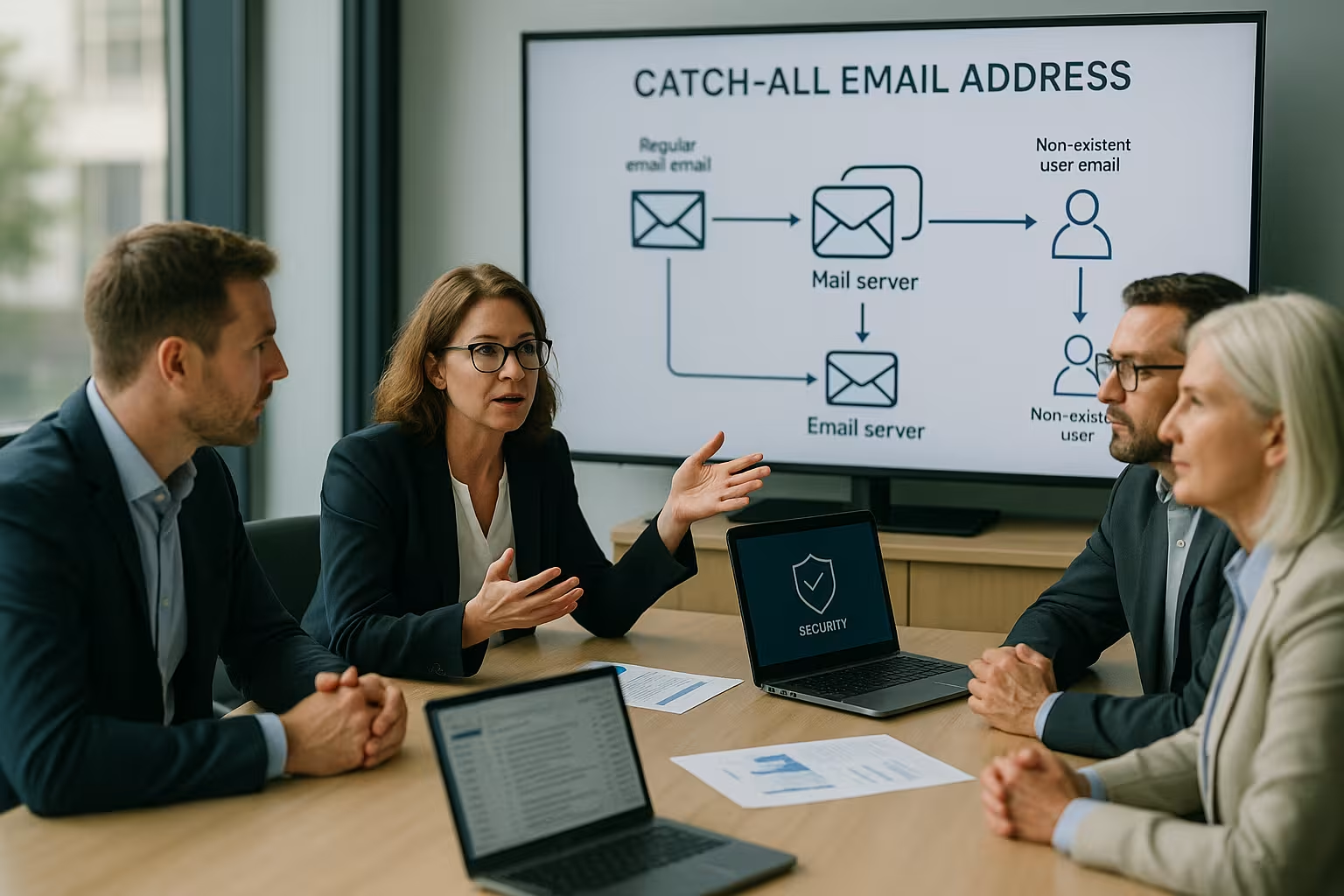
In the mail server you connect a Domain with a target mailbox that collects all undeliverables. If an email arrives at [email protected] and this address does not exist, the server checks the catch-all rule and forwards it to your defined P.O. Box further. I recommend a separate catch-all mailbox to keep your main account clean and prevent spam from reaching you. blocked. In logs, I quickly recognize which incorrect addresses appear frequently and can use them to create regular aliases. derive. This logic is simple, saves time in day-to-day business and reduces manual work. Search after lost requests.
Advantages of a catch-all address
For high accessibility I appreciate Catch-All because Typo are no longer an obstacle. Customers, partners and applicants no longer receive bounce e-mails; this has a positive effect. professional and reduces bounce rates. In growing teams, the address structure changes more frequently, but every message still reaches the Organization. I keep an eye on everything centrally and can organize incoming e-mails into subfolders by rule. sort. This minimizes frictional losses and ensures that urgent matters reach the right team more quickly and are dealt with quickly. edited become.
Risks and protective measures
Every catch-all address attracts more Spam because botnets try out random names. I therefore activate strong filters, use quarantine and regularly check the Content. Against backscatter, I avoid automatic replies to unverified senders and keep NDRs as sparing as possible. possible. In addition, I set up DMARC, SPF and DKIM to reduce abuse and increase the delivery rate. strengthen. The guide helps me with the practical implementation Set up spam filterso that legitimate mails are not filtered. disappear.
Application scenarios from practice
I use a catch-all address when there are several Areas of a company are attached to one domain and communication is widely distributed. Start-ups benefit because every request at launch speed is reliably received in the P.O. Box lands. Agencies with changing project names avoid missed pitches, even if partners have old addresses use. Private users also secure newsletter subscriptions and confirmations, although the spelling of the address is sometimes deviates. If you receive a lot of applications seasonally, you keep the inbox open even though the sender has changed the destination address. err.

Set up Catch-All: Step by step
I log into the provider panel, select the Domain and open the e-mail administration. I then define a new catch-all mailbox or select an existing account as the Goal. I then activate the catch-all option, save and send a test to a fictitious address to test the delivery. check. For structured administration and user creation, I like to use the guide to E-mail accounts in Pleskso that rollers and aliases are illustrated are. Finally, I document the setup and record who views the mailbox and how I handle escalations. handle.
Security, backscatter and server setup
I make sure that the server does not send automatic responses to fake Sender to avoid backscatter. I also activate SPF, DKIM and DMARC so that recipients can recognize my domain as a trustworthy classify. I protect quotas and size limits so that a flood of spam does not flood my inbox. fills. On the server side, the guide to Postfix settings practical Notes for delivery, limits and security. I log delivery errors, evaluate patterns and adapt rules so that the catch-all address can be used efficiently. remains.

Operation, monitoring and storage
In the company I pay attention to clean Workflowsclear responsibilities and fixed check intervals. A set of rules sorts e-mails into folders according to keywords so that support, sales or HR can immediately access them. act. I define retention periods, archive important processes and delete legacy documents in accordance with Data protection. For transparency, I document how I identify incorrect deliveries and whether they result in regular aliases should. This keeps the mailbox lean, traceable and always ready for use.
Comparison of hosters with Catch-All
When choosing a provider, I pay attention to Usabilitysecurity and fair conditions. A clearly laid out panel saves time when maintaining addresses, filters and Forwarding. For quick setup, I like to use providers with a clear catch-all option directly in the domain administration. In many tests, Webhoster.de presents itself as a very strongin terms of setup and protection functions. The following table shows a compact overview of the catch-all support of common Provider.
| Place | Provider | Catch-All support |
|---|---|---|
| 1 | Webhoster.com | Yes (highly recommended) |
| 2 | Checkdomain | Yes |
| 3 | Ionos | Yes |
| 4 | Dogado | Yes |
| 5 | One.com | Yes |

Alternatives to the catch-all address
Aliases provide a targeted Solution if you only need certain functional mailboxes. Forwarding can be fine-tuned and reduces the Spam-risk, because no address receives "into the blue". I often combine central group mailboxes with clear aliases so that responsibilities are clearly assigned. visible remain. For solo self-employed people, a few aliases are often sufficient, such as info@, kontakt@ or rechnung@, which are limited to a single Main account go. If you want maximum accessibility and expect a lot of fuzziness in addresses, you should still use the Catch-All-variant.
When I do without Catch-All - and why
As useful as the function is, I deliberately do without it when Risk and costs exceed the benefits. In highly regulated industries (e.g. health, law, finance), every misdelivery can contain sensitive content. A catch-all address would unplanned collect and then requires stricter processes, approvals and deletion concepts. High spam loads on high-traffic domains also quickly lead to Resource consumption and more manual checking. Even for very small teams with clear addresses and few touchpoints, a lean alias concept is often the best solution. more effective and saves attention.
Fine-tuning the spam defense and filter rules
So that the Catch-All doesn't get lost in the spam, I rely on graduated Filter and rules that already take effect at the SMTP inbox:
- Receiver check at the gatewayI reject non-existent standard addresses directly and only allow catch-all through if no other rule applies. This is how I prevent directory harvesting.
- GreylistingUnknown senders have to redeliver; legitimate servers do this, but many bots do not. This noticeably reduces the volume.
- RBL/URIBL examinationsKnown spam senders and malicious links are filtered early. I combine several lists with a conservative weighting.
- HELO/EHLO and PTR checksI reject gross protocol errors without generating backscatter.
- Rate limitsI limit connections per IP and per time window. This protects against sudden spikes.
- Header scoring and quarantineI mark suspicious messages, move them to quarantine and run a daily digest.
- User-oriented rules: In the mailbox, I sort by keywords, senders or subject prefixes in Subfolder.
A balanced setup is important to me: I prefer a moderately strict First stage and then a transparent review in quarantine, instead of harsh rejections and later complaints. This keeps accessibility high without clogging up the inbox. flood.
Handling auto-responders, OOO and NDRs correctly
Catch-all and automatic responses don't mix well. I avoid Out of office notes on catch-all mailboxes because they accumulate spam and trigger backscatter. Clear rules are needed:
- No OOO on Catch-AllActivate absence only on personal mailboxes.
- Minimum NDRsI do not send subsequent bounces to unverified senders; rejections are made - if necessary while of the SMTP session.
- Ticket Autoreply: For helpdesk integrations, I only use a unique Confirmation of receipt per conversation, never per message.
This means that the domain reputation remains protected and the catch-all does not become an amplifier for Spam waves.
Subdomains, wildcards and plus addresses
In larger setups I play with Subdomains and plus addresses to combine structure and visibility:
- Subdomain-Catch-All: For projekte.meinedomain.de I can run separate rules and clean statistics separate.
- Wildcard aliases: Targeted only for functional areas (e.g. *.sales@), not for the entire domain, in order to minimize spam potential. limit.
- Plus dressing: name+campaign@ is suitable for tracking and can be easily configured using rules. sort. I use it as an alternative when Catch-All generates too much noise.
It is important not to create endless loops with redirects and to assign responsibility for each variant. determine.
Integration in helpdesk and CRM
If a lot of mails are sent to the catch-all, I integrate the mailbox into Ticket- or CRM systems. Incoming emails are automatically scanned, tagged (e.g. "sales", "support", "application") and sent for processing. assigned. I pay attention to that:
- Duplicates if the same conversation was sent to several addresses at the same time.
- Sender clean deduplication so that histories are correctly converge.
- SLA rules directly from folders/tags so that priorities are maintained.
This transforms the Catch-All from a pure collection point into a productive Input channel with clear processes.
Migration and transition phases
Catch-All is particularly useful for Removals and rebrandings. I activate them temporarily to intercept old or forgotten addresses and use them to create new aliases derive:
- Time window of 60-90 days, clearly documented and communicated.
- Monitoring of the most frequent misspellings and gradual conversion into official Aliases.
- DNS planningKeep MX records stable, set TTLs appropriately so that changes roll out cleanly.
- Shutdown after the review phase, as soon as there are hardly any new misses occur.
During the migration, I keep an eye on quotas, quarantine and escalation paths to ensure that the transition phase is as smooth as possible. frictionless runs.

In-depth monitoring and key figures
For continuous use I define KPIsto make impact and risks measurable:
- Spam percentage of the catch-all volume (target: below a clearly defined threshold).
- False positives per period (quarantine review, training of inspectors).
- Mean Time to Triage: How quickly do emails end up in the right team?
- Alias promotion rate: How many misses are converted to permanent Alias?
- Reputation signalsBounces, blocklists, DMARC reports (observe trends).
I set notifications when key figures exceed thresholds and hold a short monthly review. This keeps the catch-all controllable and delivers real added value.
Security details on SPF, DKIM and DMARC
For robust deliverability, I go to the authentications in the Depth:
- SPFI pay attention to the lookup limit, reduce include cascades and avoid "+all". For redirects I plan SRS or rely on DKIM.
- DKIM: I rotate Selectors periodically, use sufficiently strong keys and ensure consistent signatures across all sending systems.
- DMARCI start with "none", evaluate reports and gradually increase to "quarantine" and "reject". Strict or relaxed Alignment-settings depending on the shipping infrastructure.
- Backscatter avoidanceRejections preferably during the SMTP phase, no subsequent bounces to unverified recipients. Addresses of origin.
These details have a direct impact on reputation and Delivery rate especially when Catch-All increases the input volume.
Processes, roles and responsibilities
Technology alone is not enough. I define clear Rollers for triage, assignment and escalation:
- First level: Sifting, spam marking, basic assignment by folder/tag.
- Second levelTechnical processing, queries, ticket forwarding.
- Owner: Responsible for rules, evaluations and Improvements.
A short playbook with examples, escalation paths and response templates ensures that catch-all emails can be sent quickly and easily. uniform are treated - regardless of who is on duty at the time.
Data protection and compliance
Because Catch-All collects more e-mails, I check Data protection particularly carefully. I keep access restrictive, only log necessary metadata and delete content after defined time limits. Deadlines. Clear deletion concepts apply to personal data, and I document how incorrect deliveries are identified and correctly deleted. treated be made public. If sensitive topics are involved, a short internal notification process is useful to ensure that information is not unintentionally disclosed. redistributed become.
Practical checklist for the start
Finally, I use a compact Checklist:
- Define goalWhy Catch-All? Define timeframe, scope, success criteria.
- Separate mailbox: Own collection account with quarantine and sufficient Quote.
- FilterGreylisting, RBL/URIBL, rate limits, header scoring; user rules for order.
- SecuritySet SPF, DKIM, DMARC correctly; no auto-replies on catch-all.
- Processes: Roles, SLAs, escalations, review and Clean-up-rhythms.
- MonitoringKPIs, alerts, monthly evaluation and alias promotion.
- Conclusion: Decide after test phase: retain, restrict or switch off.
With this framework, the catch-all address not only remains a net against typing errors, but also becomes a stable component of your communication strategy.
Briefly summarized
A catch-all address secures AccessibilityIt retrieves misaddressed emails and prevents gaps in communication. I set it up with a separate mailbox, activate strong filters and test the Delivery carefully. For security, I pay attention to DMARC, SPF and DKIM as well as clear rules against Backscatter. In dynamic environments, the function creates noticeable Reliefwhile small projects often fare better with aliases. A structured approach results in a clean system with high Transparency and minimal friction losses.