 Skip to content
An email server migration requires structured planning, clear steps and comprehensive testing to prevent data loss and minimize downtime. A professional approach allows you to implement the move efficiently and benefit from greater security, faster access and an improved administration structure.
Key points
- Backup of existing e-mail data is crucial for data security.
- DNS changes must be carried out correctly and at the right time.
- Use Automated tools for less manual work and less potential for errors.
- Communication with employees and customers prevents misunderstandings.
- Tests after migration ensure functionality and completeness.

Good preparation is essential in order to implement these points ideally. This not only avoids accidental data loss, but can also reduce the time required. Whoever is responsible for the email migration should draw up a detailed concept at an early stage that includes both the technical side and the communication to all those involved. This includes a clear allocation of roles within the team so that everyone knows which steps are required and who has which responsibilities. For larger companies, it is also advisable to have a checklist in which milestones, resources, required budget and time sequences are recorded. Such coordination is essential, especially when there are many mailboxes that may be used in different departments.
Why email migration is necessary
I opt for an email migration when my current server can no longer keep up in terms of performance, security or service. If my company grows, the organizational and technical load also increases - a more powerful server can help here. Also a Provider change from Confixx to Plesk is a typical trigger for a migration. This step is often unavoidable with outdated infrastructure or inadequate encryption. In addition, a modern hosting system can consolidate multiple accounts and simplify administration and support.
Typical reasons for a necessary change are frequent outages with the old provider, poor performance or bad spam filters that massively disrupt day-to-day work. The aspect of compliance also plays a major role in many industries: an outdated server structure can make it difficult to comply with current data protection regulations. In addition, modern mail servers must support standards such as TLS, SPF, DKIM and DMARC in order to make email communication secure and trustworthy. Switching to a new system can therefore solve several problems at the same time and ensure smoother collaboration within the team.
Preparation as a success factor
A successful migration begins with thorough planning. I first analyze the inventory: how many mailboxes exist, what folder structures are in place and how much memory does each account need? I then export all email data, contacts and calendars locally so that I can access them immediately in an emergency. I schedule the migration at a time when there is little email traffic, for example at the weekend or at night. I also inform my team in good time about the process and the potential restrictions.
It is also important to consider any extensions for calendars, contacts or tasks. Some users use CalDAV and CardDAV, for example - the corresponding services should also be set up on the new server. Possible forwarding or distribution lists created in the old system should also not be forgotten. This preparation prevents important data or functions from suddenly being missing immediately after the move. Even small details such as out-of-office responses or signatures can affect the migration process if they disappear unexpectedly. It therefore makes sense to document all settings and plan the final state as far in advance as possible.
Step-by-step guide to email migration
First, I set up the new mailbox with the same e-mail address. A strong password and possible two-factor authentication secure access. Then I connect both accounts in the mail client - the old and the new one. It is important that I implement the data transfer with IMAP: this preserves the structure and simplifies the transfer. Many hosting providers, such as those with finished Plesk integrationmake the process much easier. After a successful import, I update the DNS and MX entries of my domain so that the new server receives the mails. Tests are then carried out - I check the transmission and accessibility by sending and receiving messages.

It also makes sense to create a so-called "post-migration log". In it, I record exactly when I moved which accounts, whether errors occurred and when the DNS changes were made. I also record information about how quickly the DNS entries were updated and what potential waiting times were caused as a result. This documentation is not just for tracking purposes, but is also helpful in case any ambiguities arise afterwards.
When manually importing large amounts of data, timeout errors can occasionally occur, for example because individual folders contain a large number of messages. In this case, I split the import into smaller stages by transferring partial folders or allowing the transfer to continue outside of peak business hours. Alternatively, there are providers who offer an automated migration tool. Here, I simply create the source and target accounts and the migration service automatically takes care of all IMAP folders.

Technical best practices for migration
I use the IMAP protocol for permanent synchronization. Although POP3 pulls data locally, it often removes it from the server - which can lead to data loss. IMAP, on the other hand, is ideal for simultaneous access from a laptop, smartphone and tablet. I also pay attention to generously configured storage quotas to avoid transmission errors due to overloads. Providers with automated migration assistance, such as Audriga at hosting.de, offer professional support - particularly important for companies with many accounts.
On the server side, it is also important that the latest security technologies are implemented. Encryption protocols such as SSL/TLS must be available in a modern version so that older encryption methods, which are considered insecure, are no longer supported. Equally essential are suitable DNS entries for SPF and DKIM in order to effectively reduce spam and phishing. This often requires careful coordination with the DNS provider and any third-party systems. In addition, administrators should activate sufficient logging in order to be able to react quickly in the event of errors or anomalies. The more transparent this process is, the better subsequent problems can be eliminated.
For particularly sensitive data, it may make sense to carry out a brief security audit before the actual migration. This involves checking the server configuration, password strength and any gaps in the firewall. If I invest time in a solid security concept during the migration, I benefit from a robust, reliable email infrastructure afterwards. This protects both my data and the trust of my customers.
Efficiently migrate multiple mailboxes
If many email addresses are to change servers at once, I rely on automation. Manual transfers are not only time-consuming, but also prone to errors. Professional providers offer migration tools for this - ideal for agencies or large companies. Particularly valuable: Dedicated support and individual solution proposals from experienced technicians, such as for the secure Postfix configuration are common.
Larger organizations in particular often have numerous distribution lists: marketing, HR, accounting and so on. These collect emails and forward them to several people. When moving, I should ensure that these lists are correctly transferred to the new system or newly created. Forms from websites or ticket systems often send automated emails to corresponding collection addresses. These processes also need to be identified and tested in advance to avoid downtime or lost support requests.

Comparison of migration services
In order to select the right provider for an email server migration, it is advisable to compare the service offerings. The main differences are in support availability and automation.
| Hosting provider | Migration service | customer support | Special features |
|---|---|---|---|
| webhoster.de | Yes (test winner) | 24/7 | Individual advice |
| Provider B | Manual/automatic | Variable | Different |
| Provider C | Partial | Restricted | Depending on the tariff |
A reputable migration service not only enables me to transfer the data, but also checks the settings if necessary. Many services also offer assistance in optimizing the entire email traffic, for example by improving spam filters and checking authentication mechanisms.
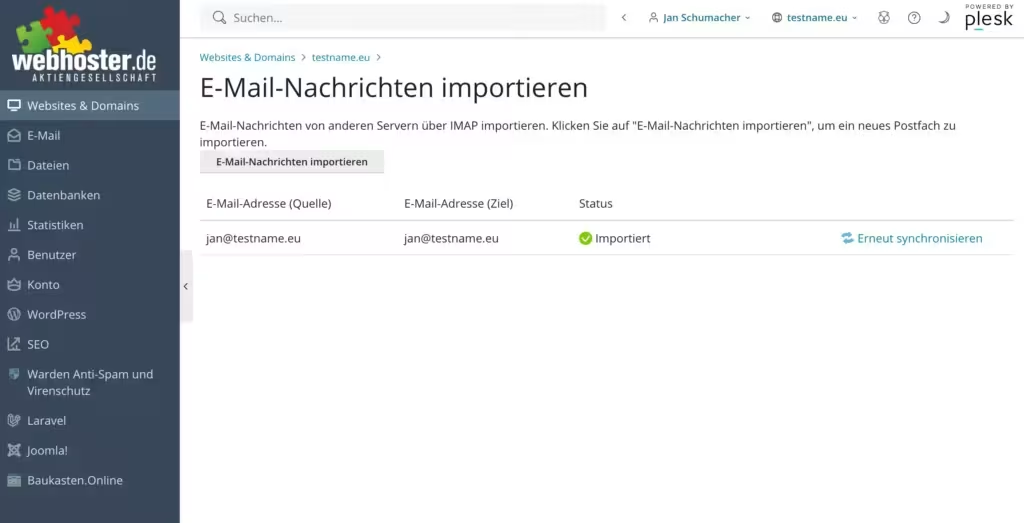
With the hosting provider webhoster.de, the end customer can also migrate the data independently with the help of a function in the interface. It is called e-mail import and makes it easy to copy the e-mails from the existing mail server to the new mailbox.
Pitfalls and how to avoid them
I come across the same mistakes time and time again: no complete backup before the move, overlooked filter rules or quotas that are too low. Another risk: incorrectly set DNS or MX entries that interfere with email reception. When setting up the new server, I also make sure that all necessary mailboxes are available and correctly named. Checking all settings after the switch solves many of these problems immediately.

An often overlooked challenge is that some mail clients have saved local filter rules that are not stored on the server. If, for example, I use Outlook functions or a special filter syntax in Thunderbird, it can happen that these rules are not automatically adopted when the IMAP server is changed. It therefore makes sense to document or export the local filters before I bind the client to the new mailbox. The same applies to archive folders that are stored on external hard disks or network storage. If they are not backed up and integrated in good time, important emails or documents may be missing later, which can lead to great frustration.
Migration during ongoing operations
A complete move with active e-mail use requires foresighted planning. I set up the new accounts in addition to the old system so that both work in parallel. Forwarding secures all incoming emails during the changeover phase. For particularly critical phases, I actively communicate with users and plan a phased migration if necessary. In this way, I significantly reduce the risk of interruptions.
The interaction between DNS entries, forwarding rules and automatic responses becomes particularly complex if some of the staff are already working on the new server while others remain on the old one. It is advisable to test core functions in a small group first before moving the mass of employees. This allows me to rectify local configuration errors, for example if a particular client or app does not recognize the new server. I also gain time and peace of mind to answer user-related questions before everyone goes online at the same time.
Automated relocation service & support
I don't rely exclusively on manual work, especially for larger scenarios. Hosting providers such as webhoster.de provide secure, supported migration paths. The direct line to technical support saves time and provides peace of mind, especially for business mail structures with many connected end devices and applications. Automated migration tools analyze data, check availability and carry out the migration in a controlled manner.
Automated solutions often include additional control mechanisms to quickly detect duplicates or failed email transfers. Some systems carry out an analysis of the source server in advance, check the current directory structure and thus create a stable basis for the actual migration. Many tools also offer the option of migrating several domains simultaneously. This makes work considerably easier for companies with complex domain structures. So if you want to save time and be safe, we recommend a tool with integrated error management and logging.
Check quality after migration
Once the move is complete, I take care of the follow-up work. This includes checking the spam and security settings, as well as updating device configurations. Filters, forwarding and autoresponders should also be adjusted. I test the functionality of applications such as calendars, mobile synchronization and external tools. I also inform my environment about the new email platform so that no message is lost.

It is particularly important that all users can log in to the new system securely and know how to retrieve or send their emails from now on. A little help, such as a quick guide or an internal FAQ, can be very helpful here. The topic of email archiving also often plays a role for companies: after the migration, it should be checked whether all data is correctly transferred to the automated or manual archiving system. It is also advisable to send test emails to some colleagues who are away or external colleagues to ensure that incoming emails from other time zones or external providers also work smoothly.
To ensure that the mails do not end up in spam filters or junk folders, it is advisable to take a look at the IP reputation of the new server. Some IPs have a bad reputation or have been misused for spam by predecessors. Here it can be useful to carry out a so-called "blacklist check" before completing the migration. If there are problematic entries, I contact the respective list operator and have the IP activated. In this way, I can ensure that my new email infrastructure is launched without any reputation problems.
Practice-proven procedure - also for beginners
An email server migration can be carried out without in-depth specialist knowledge - as long as I proceed in a structured manner. Good preparation, reliable backup strategies and targeted tools keep the changeover manageable. If I use professional migration services and test all the relevant settings, I benefit from a modern, stable email system afterwards without any communication gaps. Of course, the effort remains manageable if I make use of help from trained support.
The time saved by a perfectly configured new mail server is often underestimated: If the mailboxes are managed in a cleanly structured manner via IMAP and kept synchronized on all devices, problems with different mail statuses or accidentally deleted messages in the inbox are eliminated. The administration of user rights, groups, global address books and distribution lists can also be made much easier with a central administration tool. Ultimately, with the migration I'm not just switching servers, but optimizing my entire communication infrastructure.
In summary, it can be said that a well thought-out email server migration makes everyday work easier for everyone and saves time and resources in the long term. Of course, it requires some planning in advance and careful implementation during the move - but the benefits speak for themselves: better performance, greater reliability, consolidated accounts and, last but not least, a professional external image. Anyone who takes care of clean DNS entries, secure authentication procedures and structured testing at an early stage will immediately notice the added value after the migration.


