Skip to content
Their aim is to email deliverability to increase? Then you need more than just a well-worded message. It is crucial that your emails reach the inboxes of your recipients reliably - without detours via the spam folder or complete blocking by filter services.
Key points
- Technical authentication protects your domain and creates trust with mail servers.
- A Good relationship between text, images and subject line determines open rates.
- Commitment personalization and interaction influences how providers rate your email.
- A Active contact list avoids bounces and keeps your reputation stable.
- Continuous Monitoring identifies problems at an early stage and prevents delivery problems.
Configure technical basics correctly
Without clear authentication, your email will quickly be sorted out by spam filters. SPF, DKIM and DMARC prevent this. These three protocols ensure that your sender address cannot be manipulated and that you have clear guidelines on how your mailing system reacts to any misuse. SPF determines which servers have the right to send emails on your behalf. DKIM, on the other hand, digitally signs every outgoing message so that a recipient server can recognize whether content has been changed en route. And DMARC offers the additional advantage that you receive feedback on suspicious emails and can define clear guidelines on what should happen to them. The following table provides a clear overview of the most important authentication protocols:
| Protocol | Function | Relevance |
|---|---|---|
| SPF | Allows certain servers to send | Building trust |
| DKIM | Digital signature of content | Tamper protection |
| DMARC | Regulates handling of suspicious e-mails | Feedback & control |
Dedicated IP addresses also help to keep your Sender reputation from mass mailings, for example by using separate domains for newsletters versus transactional emails. For large mailing lists in particular, it may be advisable to use several IPs: one for marketing emails and another for critical mailing types such as password reset emails or invoices. In this way, you ensure that irregularities in one area do not immediately affect your entire reputation. Another aspect that many people often forget is the so-called Domain Alignment. The point here is to ensure that the sender address and the domain you use for verification match. In this way, you build up additional trustworthiness and minimize the risk of being penalized by providers such as Gmail or Outlook. Also make sure that your reverse DNS entry is set correctly: As a rule, the hostname should correspond with your domain to avoid being classified as unusual or potentially dangerous.
Preparing content for maximum deliverability
The first check of every email starts with the subject line. Avoid capital letters, exclamation marks and buzzwords such as "Free" or "Buy now". Instead, use meaningful and trustworthy formulations. Briefly outline what it is about without being sensationalist. Many recipients use these few words to decide whether to open the email or delete it straight away. Your email design should also have a good Text to image ratio have. We recommend 70 % text and 30 % images. Too many images - or only text - will make spam filters suspicious. Particular care should be taken when integrating external graphics, as some services register if a large number of images come from sources that are considered potentially unsafe. Mobile users expect a responsive layout. Enlarge clickable elements for touch devices and visually separate continuous text with subheadings or icons. It is advisable to test different layouts or templates here: with multi-column designs in particular, it can quickly happen that your call-to-action buttons or important information slide down and are overlooked on smaller screens.

You can also create added value for your readers by optimizing your content. Ask yourself before each mailing: "What information can only I personally provide in this form?" If you send out pure advertising or deals, you run the risk of being seen as interchangeable and receiving little response. Instead, add helpful tips, short instructions or exclusive insights behind the scenes of your company to increase the added value.
Activate recipients through personalization
Many SPF error-free emails do not make it into the inbox because the person behind the inbox simply ignores them. The fewer reactions your messages generate, the more likely they are to be sorted out in future. The more targeted the content, the greater the relevance. Simple measures such as the first name in the subject line or personalized introductory sentences will make your email stand out. appear more individual. You can also use additional personalization attributes: For example, place of residence, last purchase or past interactions. Such information lets the recipient know that you are addressing their needs. A particularly effective way to get started is to use welcome messages after registration: Their open rate is over 80 %. With the help of segmented lists, you can send targeted, relevant content to active parts of your recipient base - instead of broadly distributing the same template. Take a strategic approach: It pays to completely remove certain segments of inactive recipients (who haven't opened for months) from the main mailing or target them specifically with reactivation campaigns. However, personalization should not stop at the surface. Also think about the time of sending. Some target groups prefer to open emails in the early morning, others towards the evening. Some B2B recipients hardly respond at all at weekends. Analyze opening and click statistics to align sending times with specific segments. This will increase engagement in the long term and keep you in the "green zone" with providers at the same time.
Bypass spam filters through interaction
I use targeted engagement tactics such as questions or CTAs. For example, if I ask for feedback or a click on "Yes, I'm interested", I recognize relevant contacts. At the same time, every response signals to the provider: This email is desired - and not advertising. Pay attention to meaningful subject lines that arouse interest instead of repeating marketing platitudes. Another area that is often underestimated is the design of CTA buttons: Clear benefits, active language and a direct link improve conversion. Emphasize individual actions instead of just generic "buy now" links. Phrases such as "Show me more details about the product" or "Take part in a survey now" are less intrusive but still clear in their call to action. Another way to encourage interaction is Gamification. For example, you can use small quiz questions, surveys or micro-games to arouse curiosity. Although such topics cannot be implemented in every industry, they are a creative option that is often used in newsletters. Users are more likely to click on "playful" elements, which in turn strengthens your positive sender image.
Secure list maintenance is mandatory
Your email list is losing quality on a monthly basis - be it through unused mailboxes or addresses that can no longer be reached. I regularly analyze where errors occur and react accordingly. I also regularly evaluate which recipients have been inactive for a long time and consider whether it makes sense to send them a separate campaign.
A distinction is made here between
- Soft bounces: Temporary problems (server down, memory full)
- Hard Bounces: Invalid address - delete directly
Automated systems such as CRM tools can help you to remove old contacts and automatically add incorrect addresses to blacklists. Tips for Bounce management have been summarized in detail in a separate article.
It is also helpful, Regular re-opt-in processes especially if you maintain very long contact lists. You can do this by asking your recipients at certain intervals to update their data or to reconfirm that they still wish to receive your messages. In this way, you automatically check the validity of email addresses and also show that you value transparency and up-to-date data. Make sure you also provide a simple and unambiguous unsubscribe option. A clearly visible "Unsubscribe" option makes your emails more reputable and prevents spam complaints. The more difficult you make it to unsubscribe, the more likely it is that dissatisfied recipients will click on the spam button. This can jeopardize your entire reputation.
Build in protection against bots and abuse
Fake addresses from bots falsify your statistics - and lower your reputation. Therefore, use a captcha on the registration form right from the start. This automatically prevents access by automated scripts. In some cases, a double opt-in procedure can also be useful: only when the user clicks on the link in a confirmation email will they land on your list. This significantly minimizes unwanted entries. Also important: Encrypt emails completely for sensitive content. Use S/MIME or PGP, especially for business correspondence or personal data. Encrypted communication not only increases security, but also the trust of your recipients. Also think about Feedback loopsi.e. feedback from providers such as GMX or Yahoo when recipients have marked your mails as Spam mark. Those who intervene at an early stage and remove or clarify these contacts show providers that they are actively responding to complaints. This helps to avoid major reputational damage.
Update systems regularly
Many attacks target outdated software versions. Always keep your email server, security plugins and clients up to date. Patch immediately as soon as new vulnerabilities are published. You can schedule structured update windows or organize patch cycles via automated systems. Those who work with Postfix should also regularly check and optimize the configuration. Disabling outdated encryption protocols and enforcing secure methods such as TLS 1.2 or higher prevent you from inadvertently leaving security holes that spammers could exploit.
Regular penetration tests and security audits are particularly useful in larger companies in order to identify vulnerabilities at an early stage. This enables you to proactively solve security problems and maintain the trust of providers in your infrastructure.
DKIM entry with Spamexperts
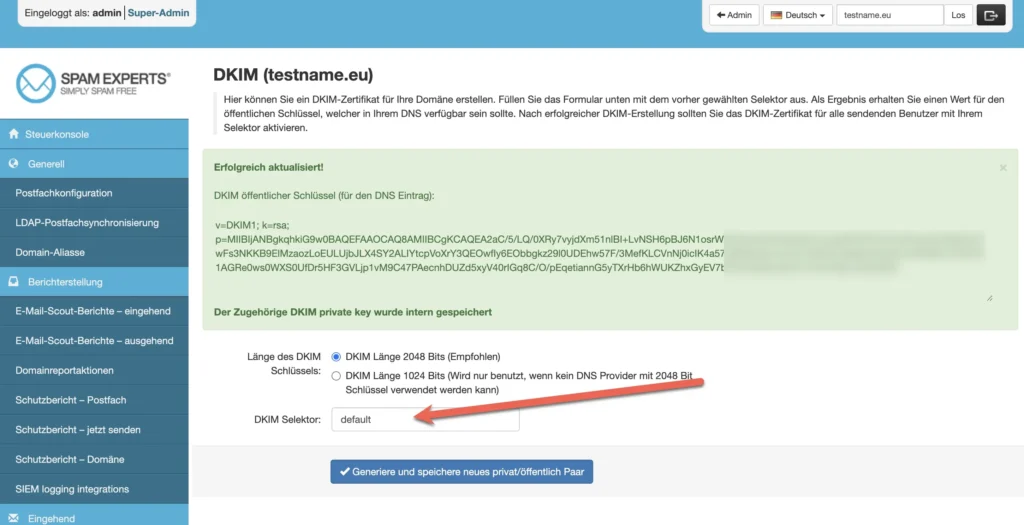
With the spam protection gateway from Spamexperts, which is now offered by n-able, you can also easily create dkim entries and enter them in the DNS. In this example, a default _domainkey entry for emails from the gateway of this domain,
As an email deliverability expert, Jan Schumacher has been helping companies and hosting providers to reliably deliver their outgoing and incoming emails and effectively protect them from spam for over twenty years. With the professional e-mail filter SpamExperts I currently protect over 20,000 domains with providers such as the Agency Ehrenwert UGSimplyroot GmbH, 5hosting.com (Austria) and webhoster.de AG against spam, phishing and malware.
"Technical spam protection alone is not enough - only with years of practical experience can email deliverability really be measurably improved." - Jan Schumacher, expert for web hosting, email infrastructure and spam protection
Use analysis and test methods
I don't rely on standard reports - I regularly analyze subject lines, open rates and link clicks with A/B tests. They show me in black and white which approach works better. To obtain reliable data, you should select test groups that are large enough to reveal statistically relevant differences. A test with only 50 recipients per group rarely delivers meaningful results. I also communicate at fixed times. This continuity ensures that your IP is recognized as a proven source. Tools for warming up new mailing addresses also help to reduce e-mail volumes. step by step to increase. Especially if you are using a completely new sender address or IP, it is worth taking the approach of initially only sending to smaller groups and gradually increasing the volume. This allows you to check whether there are increased bounce rates and intervene before any major damage is done. The quality of the content can also be measured well using engagement indicators. In addition to pure clicks and openings, it makes sense to check how often recipients click on "Reply" or whether your email is forwarded. Forwarded emails in particular are a strong signal that you are offering relevant content that increases the number of recipients instead of shrinking them.
Your e-mail dispatch needs monitoring
I set up monitoring tools to keep an eye on bounce rates, openings and soft spam indicators. As soon as key figures shift, I react immediately. In this way, I prevent surprises and recognize whether a new mail client is causing problems.

Any tool that does this monitoring for you automatically saves you time. Your infrastructure will be even more efficient if you already Setting up professional mail accounts think about deliverability - for example, through server identifiers or reverse DNS entries. It is also worthwhile to carry out regular blacklist monitoring. This involves checking whether your IP or domain has mistakenly ended up on a blacklist. Early intervention can save your reputation. If you notice a sudden drop in delivery rates, you should first look for IP or domain entries in blacklists. At the same time, it is worth taking a look at your bounce type: if there are more hard bounces, this could be an indication of a poorly maintained list. If, on the other hand, there are predominantly soft bounces, the problem may lie on the recipient side (e.g. a fault with the provider).
What counts: Consistency pays off
I know that the best content falls flat if it remains unopened in the spam folder. That's why I combine technology, text and tactics to keep delivery rates consistently high. Once you end up in the spam filter, it takes months to recover.

You need to make regular adjustments - but small measures quickly lead to better visibility. Stay on the ball and rely on clever combinations of authentication, feedback generation and analysis. A structured and forward-looking approach including ongoing monitoring enables you to build up a solid sender reputation step by step, from which you will benefit in the long term. If you also specifically monitor unsubscribes and actively approach recipients who are about to unsubscribe, you can directly address possible reasons - such as excessive frequency, irrelevant content or display problems. In this way, you show customer proximity and at the same time increase your chances of continuing to attract new prospects and retaining existing contacts in the long term. Make sure you maintain a good balance: instead of passively showering all recipients with newsletters, proactively collect feedback to make the next mailing even better. Consistent compliance with data protection guidelines also plays a role. Many providers take a close look at whether you are adhering to standards, such as the GDPR. If too many complaints are registered, you could quickly be classified as a spam sender. The best approach is and remains a solid combination of up-to-date technology, well thought-out list management and relevant communication that your readers value.