 Skip to content
Headless cms hosting combines API-centric content management with flexible playout paths via web, apps and devices; I show how hosting architecture, CDN and caching have a measurable impact on time-to-first byte and reliability. Those who plan modern content workflows make resilient decisions with decoupled backends, scalable databases and automated deployments for a Headless-architecture.
Key points
I will briefly summarize the most important aspects here.
- Scaling and API performance planning
- Cloud vs. self-hosted realistic calculation
- Security enforce at the API
- CDN caching Use for reach
- DevOps and CI/CD throughout

What does headless CMS mean in practice?
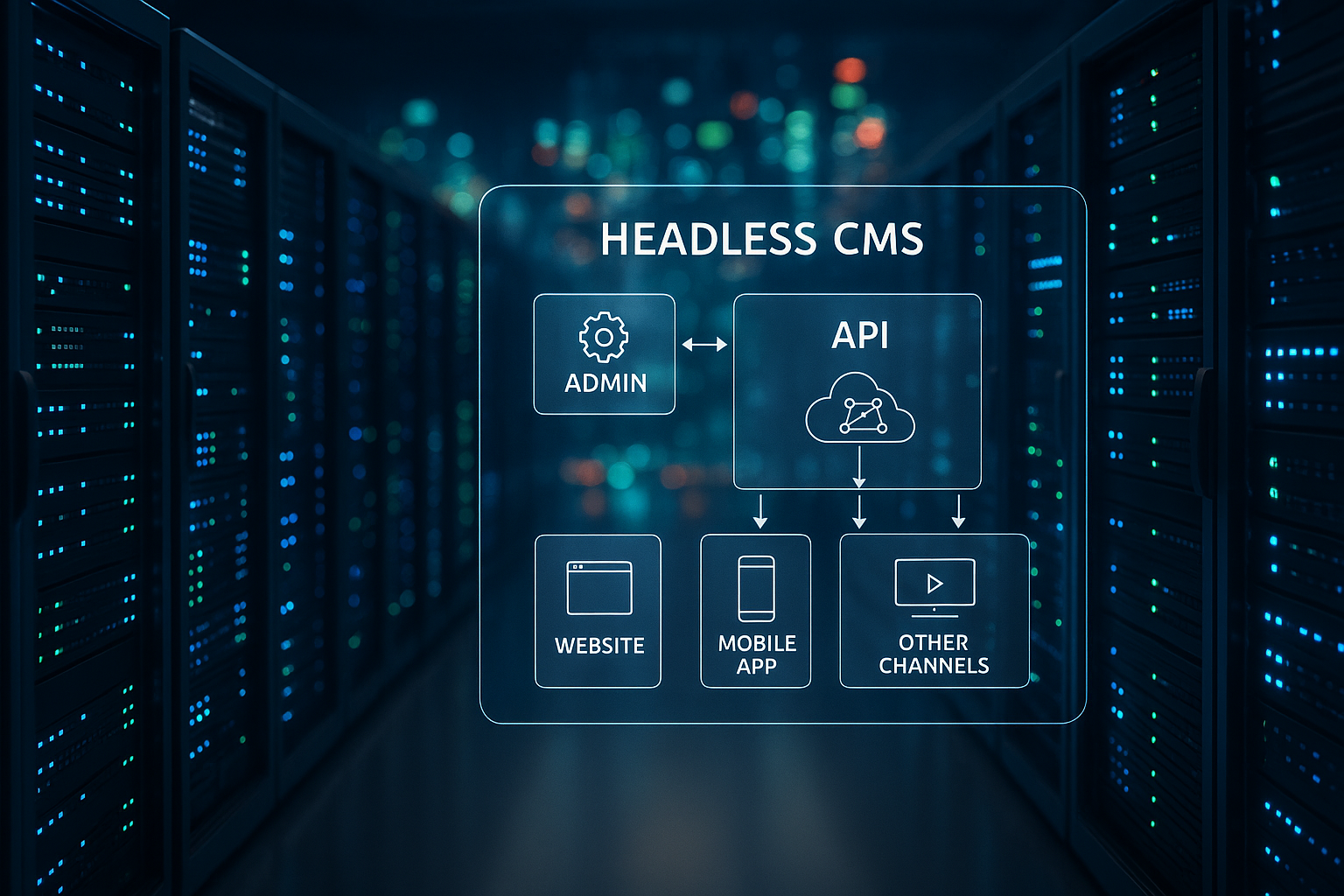
A headless CMS strictly separates presentation and administration, content flows via APIs to every interface. This allows me to publish the same content in parallel on the website, app, display or assistant without having to maintain redundancies. This decoupling requires clear performance targets, because every millisecond of delay has an impact on conversions. I define early on which channels are prioritized for loading and which content ends up in the edge cache. This means that delivery can be planned, while the editorial team in the backend works in a clearly structured way and the Content models remain stable.
Hosting models: cloud or self-hosted?
Cloud services such as Contentful, Storyblok or Prismic take care of operation, scaling and security updates for me, for which I pay between around €9 and €500 per month depending on the package; Enterprise can be significantly higher. Self-hosted with Strapi, Directus or Payload on a VPS starts roughly between €10 and €50 per month, plus database, backups and CDN. I weigh up independence against convenience: full data sovereignty and configuration speak in favor of self-hosted, speed at startup and predictable roadmaps speak in favor of cloud. For teams without admin resources, cloud often provides the faster way to Productivity. Projects with special integrations, on the other hand, often benefit from their own Infrastructure.

Performance: Combining latency, CDN and caching correctly
API response times depend heavily on network paths, database access and caching, so I use them as early as possible CDN with edge rules. Static or rarely changed content ends up as JSON in the edge cache, while personalized data comes directly from the origin. For build-based frontends like Next.js, I use SSG or ISR to deliver first byte from the CDN. Additional layers such as HTTP caching headers, ETags and efficient cache keys reduce the load on the CMS. The guide to JAMstack Best Practices, which I use as a blueprint for projects with many read accesses and so TTFB noticeably lower.
Scaling and budget: how to calculate realistically
I start with load profiles: Number of content editors, expected API requests per minute, data size per document and peak times; from this I derive server sizing and reserve. Cloud tariffs seem predictable, but API overages and additional projects drive up costs, so I check limits carefully. With self-hosted, I calculate VPS, database instance, CDN and backups; in total, I often end up with between €30 and €200 per month, depending on traffic and redundancy. Auto-scaling in the cloud saves operational costs, while container orchestration on your own hosting offers more control. A buffer remains crucial: I keep at least 20 % of reserve capacity so that releases, crawlers and Seasonal peaks not slow down the system; this pays off with Traffic peaks from.
Security for APIs: Think Zero Trust
Every API is publicly visible or at least addressable, so I plan to Security right from the start. I enforce TLS everywhere, manage secrets centrally and rotate them automatically. Rate limiting, IP allowlists and web application firewalls block misuse, while audit logs provide complete documentation. I keep roles and rights in the CMS granular so that authors only see and edit the collections they need. In addition, I decouple the CMS from the public network via gateways so that API keys, tokens and Headers do not end up in front-end bundles.
Databases and persistence: select appropriately
Strapi and Payload often work with PostgreSQL, Directus uses SQL databases very efficiently; MongoDB is also suitable for flexible document structures. For read-intensive projects, I use read replicas and relieve the primary node. I like to encapsulate search functions in a separate engine so that editor actions and queries don't slow each other down. I automate backups as snapshots plus point-in-time recovery, tested with restore samples, not just scripts. Indexing, connection pooling and a lean Scheme often bring more than pure hardware upgrades; I pay particular attention to this with increasing Data volumes.

CMS options and hosting types at a glance
The choice of system has a significant impact on hosting requirements, which is why I carefully compare the license, database compatibility and API scope. Open source is a good fit for projects with special integrations, while SaaS offerings score points with editorial teams with quick releases. I also check roadmaps and community activity to ensure long-term maintenance. The following table summarizes the common options and shows typical fields of application. This allows me to quickly recognize which Setup fits the project goal and how I structure costs; I often use this overview in Pitches.
| CMS | License model | Hosting type | Costs | Best for |
|---|---|---|---|---|
| Strapi | Open Source | Self-Hosted | Free of charge + hosting | Developers, Startups |
| Directus | Open Source | Self-Hosted | Free of charge + hosting | Database projects |
| Payload | Open Source | Self-hosted / Cloud | Free of charge / from 25 € | TypeScript/React stacks |
| Prismic | Proprietary | Cloud | from 9 €/month | Beginner-friendly |
| Storyblok | Proprietary | Cloud | from 20 €/month | Content marketing |
| Contentful | Proprietary | Cloud | from 489 €/month | Enterprise |
| Umbraco | Open Source | Self-hosted / Cloud | Free of charge / from 25 € | .NET projects |
Front-end strategies: choosing SSG, ISR and SSR pragmatically
Static playout (SSG) delivers maximum speed from the CDN, while ISR enables predictable revalidations after live changes. SSR is suitable for personalized pages, A/B tests or dynamic dashboards, but requires more node resources. For WordPress as headless, I use SSR sparingly and only where interactivity without client overhead counts; a good introduction is provided by SSR with WordPress. It remains important to bundle API calls to avoid waterfalls and to keep fields in the content model lean. This keeps the frontend maintainable, while SEO through quick first paints and clear metadata; this pays off directly on Core web vitals in.
Targeted use of hybrid architectures
Many teams combine SaaS CMS with their own hosting for the frontend to combine editorial convenience and full build control. I encapsulate business logic in microservices, while the CMS delivers content and the CDN ensures global reach. For store projects, this mix pays off because pricing, shopping cart and search scale separately; if you want to go deeper, start with Headless Commerce Hosting as a reference. A clean observability chain remains important: logs, traces and metrics converge in one place. This allows me to recognize bottlenecks early on and react before Peak traffic costs; this has proven itself in Actions.
DevOps, CI/CD and deployments without friction
I containerize the CMS with Docker, keep environments consistent and use CI/CD for tests, builds and secure releases. Secrets end up in vaults, while migration scripts for databases remain versioned. Canary releases or blue-green deployments prevent downtime, especially for large content models. I plan rollbacks as a first step, not as an emergency solution, so that releases run smoothly. Standardized pipelines save time, reduce the risk of errors and strengthen the trust of the customer. Teams in frequent deployments; this flow has a direct effect on Quality.
Typical mistakes and how to avoid them
A content model that is too broad slows down the editor experience and API performance, so I keep fields clear and document relationships. A lack of cache strategies leads to load peaks, so I regularly check hit rates and adjust TTLs. Unclear roles in the CMS create risks, so I strictly implement least privilege. Monitoring without alarms is of little use; I install concrete threshold values for latency, error rate and CPU utilization. Finally, I plan data backups with restore tests, because only a successful Recovery counts, not a green job status in the scheduler.
Architecture blueprints for reliability
I think high availability right from the start: Which SLA do I want to commit to, and which RTO/RPO targets do I secure with architecture patterns? In practice, I plan at least multi-AZ setups for the CMS and the database, optionally multi-region for business-critical projects. Active-Passive with asynchronous replication reduces complexity, Active-Active offers the lowest latency, but requires clean conflict resolution. DNS failover and health checks at the edge ensure that requests automatically migrate to the healthy region. I test Disaster recovery regularly: backup-restore, promoting a replica, switching queues and restarting workers. Only documented runbooks and practiced drills make resilience reliable - not the diagram alone.
Think API design and data access cleanly
Whether REST or GraphQLI minimize over- and underfetching. Selective fields help with REST, Pagination and batch endpoints, with GraphQL I rely on persisted queries and depth limits to prevent misuse. I maintain consistency with status codes, idempotency for mutations and established Retry strategies for timeouts. Caching benefits from clear ETags, cache control with stale-while-revalidate and well-defined keys (locale, auth context, variants). I trigger changes to the content via Webhooks on: Invalidate events land in a queue that supplies CDN purger and search indexer decoupled. This keeps TTFB and consistency high without burdening the CMS with secondary tasks.
Internationalization, preview and workflows
I plan multilingual content with Locales, fallback chains and clear separation of copied vs. inherited fields. For editorial teams, a reliable Preview central: I provide preview tokens that bypass edge caches and deliver temporary content securely. I deliberately keep workflows lean - draft, review, publish - and only add release steps where compliance requires it. Branch-based environments (e.g. Preview-Envs per feature) increase speed: editors test texts on the real front end, while developers deploy independently. I control publication windows and content freezes via schedulers and feature flags so that campaigns are live at time X.
Media handling and asset pipeline
Assets often determine Core web vitals. I store media in object storage, use transformation services for Responsive Images (sizes, crops, formats) and preferably deliver AVIF/WebP with fallbacks. Signed URLs and private buckets protect internal files, while the CDN caches variants per device class. Cache keys contain transformation parameters so that no conflicts arise. For video, I use adaptive bitrates and poster frames to avoid blocking first paints. I validate upload processes on the server side (MIME, dimensions, metadata) and create thumbnails asynchronously via queues so that the CMS remains responsive.
Compliance, data protection and governance
Data protection starts with data minimization: Which data PII do I really store in the CMS, what belongs in dedicated systems? I back up Encryption at Rest and clear key management, keep Retention policies and document deletion processes. I control data residency via regional deployments, logs and audit trails remain tamper-proof and are archived in an audit-proof manner. I separate roles organizationally (editorial, technical, legal) and technically (least privilege, 2FA, SSO). A practiced Governance model with approvals, naming conventions and versioning makes projects sustainable - especially when teams grow or external partners dock on.

Optimize costs without surprises
I reduce costs by using the right levers: a high Cache hit ratio in the CDN (>90 %) reduces origin load and egress. I plan API limits realistically, bundle requests in the frontend and avoid unnecessary revalidations. I optimize build-based frontends with incremental builds and differentiated Revalidate intervals. For self-hosted, I check reserved capacities and autoscaling limits; I use off-peak hours for maintenance. I separate storage according to access frequency (hot/warm/cold) and monitor egress hotspots (e.g. large images, feeds). A simple cost dashboard made up of logs and metrics makes outliers visible and prevents them from occurring later. Overages.
Migration from monolith to headless stack
I migrate iteratively according to the Strangler patternFirst low-risk content (blog, landing pages), then complex modules. I document content mapping and field transformations precisely; scripts migrate versions, authors and references in a traceable manner. Redirects (301/410), canonical URLs and unchanged slugs ensure SEO. I generate sitemaps and feeds from the new stack, while the old system is gradually switched off in parallel. A dual-run phase with synthetic checks and real traffic provides security before DNS finally moves. Important: content freeze windows and training so that the team is not working in two worlds at the same time.
Test strategy, monitoring and SLOs
I combine unit, integration and Contract tests for APIs so that schema changes do not trigger any surprises. Load and spike tests show when queues start to grow or databases reach their limits; I derive scaling rules from this. SLOs I formulate measurable metrics (e.g. p95 TTFB, error rate, availability) and link alarms to budgets instead of just individual metrics. Synthetic monitoring checks public endpoints and preview routes, tracing with correlation IDs connects front-end requests with back-end queries. I keep runbooks and on-call plans clear: who responds to what within which minutes? This turns observability from a diagram into an operational reality.
30-day plan: from PoC to production-ready
- Week 1: Define load profiles, SLOs and security bases; establish content model as a schema.
- Week 2: Set up CDN rules, edge caching and preview flows; test first ISR/SSG routes live.
- Week 3: Database tuning, read replicas and backups with restore tests; webhooks and queues for invalidation.
- Week 4: CI/CD with Blue-Green, versioning migration scripts, activating synthetic checks and alarms.
- Go-live: activate traffic buffer, monitor cost dashboard, keep runbook ready for rollback.
Decision support in 60 seconds
Quick start and low maintenance? Then a cloud CMS with predictable rates is often the right choice, especially for content teams without their own Ops expertise. Full control and long-term cost sovereignty? Then I prefer self-hosted with Strapi, Directus or Payload. High governance, compliance and integration requirements? Then I plan for enterprise SaaS or .NET stacks like Umbraco. No matter which model I choose, I first check the content model, traffic forecast and team roles; these three factors decide on Scaling, budget and schedule in the Project.
Briefly summarized
Headless CMS pays off when APIs deliver quickly, caches work and deployments run smoothly. I make the choice between cloud and self-hosted based on team resources, flexibility requirements and budget. A clean content model, clear roles and measurable KPIs form the guard rails for growth. I ensure availability and loading times with a CDN strategy, monitoring and automated pipelines. If you consistently combine these building blocks, you get a resilient Headless platform, that plays out content efficiently everywhere and creates sustainable Performance supplies.


